Enter your domain name :
Keywords :
Check Positions upto :
Enter keywords in separate line.
Example:
keyword1
keyword2
keyword3
Search Engines :
Check Positions upto :

Let's say you just made a website about dog grooming. You want people to find you on Google when they search "dog grooming near me." But how do you know if your site is showing up at all?
That's where a keyword position checker comes in. It's a simple tool that tells you exactly where your website appears in Google's search results. Think of it like a scoreboard — it shows your current rank so you know if you're winning or need to try harder.
The good news? You don't need to be an SEO expert to use one. Most tools are free, fast, and require zero technical skills.
A keyword position checker is a free online tool. You type in your website address and a keyword. The tool then searches Google and tells you what number position your site appears at.
For example:
You enter your website: smallseotools.co.uk
You type a keyword: "best chocolate cake recipe"
The tool tells you: Your site is at Position #7
💡 Simple Definition: A keyword position checker is like asking Google, "Where does my website show up when someone types this word?" — but without Google showing you a biased answer.
Here's something most people don't know: when you search Google, the results are personalized just for you. Google remembers what you've searched before and adjusts results to match your habits. That means your own Google search isn't a fair way to check your real rank.
A keyword rank checker bypasses this problem. It gives you a neutral, unbiased result — the same one any random person anywhere would see.
Here's the truth about Google rankings. Most people never scroll past the first page. Many never go past the top 3 results. So where you rank has a huge impact on how many people find your site.
~28% of all clicks go to the #1 result on Google
75% of people never go to page 2 of search results
10x more traffic from position #1 vs. position #10
Knowing your position helps you:
See which pages are doing well — and which need help
Track progress after you make changes to your site
See how you compare to your competitors
Find keywords that are almost on page one (easy wins!)
Prove your SEO work is actually paying off
You can't improve what you don't measure. Your keyword ranking is the number one signal of your SEO health.
— Core SEO Principle
Using a keyword position checker takes about 30 seconds. Here's how it works, step by step:
1 Go to the tool
Visit a free keyword position checker tool online. No sign-up needed for most free tools.
2 Enter your website address
Type in your domain name. For example: myblog.com. You don't need to add "https" — just the main address.
3 Type in your keywords
Add the words or phrases you want to check. Most tools let you check more than one keyword at a time — put each one on its own line.
4 Choose your search engine and country
Pick Google, and then choose your country (like Google UK, Google US, Google Australia). Rankings can be different in different countries.
5 Hit "Check" and see your results
In a few seconds, you'll see the exact position of your website for each keyword you entered. Simple as that!
✅ Pro Tip: Check positions up to 100 or 200 so you can find keywords where you're ranking on page 2 or 3. Those are the easiest to push to page 1 with just a little extra effort.
When you get your results, you'll see a number next to each keyword. Here's a quick guide to what those numbers mean:
| Position | What It Means | Traffic Potential | What To Do |
|---|---|---|---|
| #1 – #3 | Top of Page 1 🏆 | Very High | Keep it up! Don't let it drop. |
| #4 – #10 | Page 1 — lower half | Good | Improve content to push higher. |
| #11 – #20 | Page 2 | Low | Easy win zone — small improvements can jump you to page 1. |
| #21 – #50 | Pages 3–5 | Very Low | Need stronger content and backlinks. |
| #51+ | Deep pages | Almost none | Major SEO work needed. |
| Not Found | Not in top 500 | None | Page may not be indexed or content needs a full rethink. |
⚠️ Don't panic if your position changes a little each day. Google rankings go up and down all the time — even by 1 or 2 spots. This is normal. Focus on the general trend over weeks, not daily changes.
Found out you're on page 2 or 3? Don't worry — there are clear steps you can take to move up. Here are the most proven ways to climb Google's rankings:
Google rewards pages that fully answer a searcher's question. If you're ranking for "how to bake bread," make sure your page covers the whole process — ingredients, steps, tips, common mistakes, and more. A longer, more helpful page often beats a short one.
Include your main keyword in your page title, the first paragraph, a few subheadings, and throughout the text. But don't stuff it in every sentence — write for real people first, Google second.
A backlink is when another website links to yours. Google sees backlinks as votes of trust. The more quality backlinks your page has, the higher it tends to rank. Focus on getting links from real, relevant websites in your topic area.
Make sure your page loads fast, works on mobile, and is easy to navigate. Slow pages or broken links can hurt your ranking even if your content is great.
Keywords where you're already ranking at positions #11 to #20 are your biggest opportunity. You're close to page 1 already — a small content improvement can push you over the line.
🚀Quick Win Strategy: Find any keywords where you rank between #11 and #20. Update those specific pages. Add more detail, better images, and a clear answer to the searcher's question. Then check your position again in 2–4 weeks.
There are many tools out there — both free and paid. Here's a simple comparison so you can pick the right one:
| Feature | Free Tools | Paid Tools (e.g. SEMrush, Ahrefs) |
|---|---|---|
| Check basic keyword positions | ✓ Yes | ✓ Yes |
| Multiple countries / regions | ✓ Yes (most) | ✓ Yes |
| Daily rank tracking | ✗ Limited | ✓ Yes |
| Historical ranking data | ✗ Rarely | ✓ Yes |
| Competitor ranking analysis | ✗ Limited | ✓ Advanced |
| AI Overview tracking | ✗ No | ✓ Yes (newer tools) |
| Price | Free | $50–$200+/month |
| Best for | Beginners, small sites | Agencies, large sites |
If you're just starting out or running a small website, a free keyword position checker does everything you need. Once you grow and need daily tracking or competitor data, you can upgrade to a paid tool.
Getting the most out of a keyword position checker is about being consistent and smart. Here are the habits that separate great SEOs from average ones:
Check weekly, not daily. Daily checks cause unnecessary panic. Weekly checks show real trends.
Track your top 10–20 keywords. Don't try to track 500 keywords at once. Pick the ones that matter most to your business.
Check mobile AND desktop. Google ranks pages differently on phones versus computers. Check both if your tool supports it.
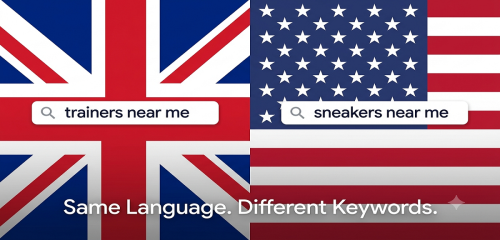
Check for the right country. A UK business should check Google.co.uk, not Google.com. Rankings can be totally different.
Write down your results. Keep a simple spreadsheet. Note the date and your positions. This gives you a history to look back on.
Check after every big content update. Made changes? Check your rankings 2–3 weeks later to see if they helped.
Look for drops quickly. If a keyword suddenly drops 10+ positions, check for technical issues on that page right away.
A keyword position checker is a free online tool that shows where your website appears on Google when someone searches for a specific word or phrase. You type in your website and keyword, and the tool returns your exact ranking position.
Yes! Many keyword position checker tools are 100% free. You just type in your website address and keyword, and the tool shows your rank in seconds. No sign-up or credit card needed for most free tools.
Check your keyword rankings at least once a week. If you recently updated your content or built new backlinks, check more often — about every 3 to 5 days — to see the impact of your changes.
If your keyword isn't showing up, a few things could be happening: your page might not be indexed by Google yet, your content might not match what searchers want, your site may have technical issues, or you may need more backlinks to compete.
Yes! Most keyword position checker tools let you enter ANY domain name — not just your own. Just type in a competitor's website and the keyword you want to compare. This is a great way to see where your competitors are beating you.
Google personalizes results based on your search history, location, and browsing habits. So your own Google search is biased. A keyword position checker bypasses this and shows the true, neutral ranking that anyone would see.
Position #1 to #3 is excellent. Positions #4 to #10 are good — you're on the first page. Positions #11 to #20 (page 2) are close and worth improving. Anything beyond position #20 gets very little traffic and needs significant SEO work.
It depends on your competition. For low-competition keywords, you might see improvements in 2 to 4 weeks after making updates. For highly competitive keywords, it can take 3 to 6 months of consistent SEO work.
A keyword position checker is one of the most useful free tools for any website owner. It takes seconds to use, and it tells you something incredibly important: are people actually finding you on Google?
Start by checking your top keywords today. Write down where you stand. Then use the tips in this guide to improve. Check again in a few weeks. Over time, those small improvements add up — and more rankings mean more visitors, more customers, and more growth for your site.
The best part? You don't need to spend a single penny to get started. Use a free keyword rank checker, track your progress, and let the data guide your next move.
🎯 Your action plan: Pick 5–10 important keywords for your website. Check their position right now. Save the results. Then come back in 2 weeks after making one improvement — and see what changed.
Plagiarism Checker Keyword Position Checker Article Rewriter Grammar Checker





 ™
™