
Is your website slow? Do you worry about hackers? You are not alone. Millions of website owners feel the same way.
The good news is that you can fix both problems with one free tool. That tool is Cloudflare. It acts like a super-smart shield for your website. It makes your site load fast, stops bad visitors, and keeps your site online even if you get a big traffic spike.
In this guide, you will learn what Cloudflare is, how it helps your SEO, and how to set it up step by step. No tech degree is needed. Let us start.
What is Cloudflare? (The Simple Explanation)
Imagine you own a small shop. If a thousand people show up at once, your shop will get crowded. Nothing will work fast.
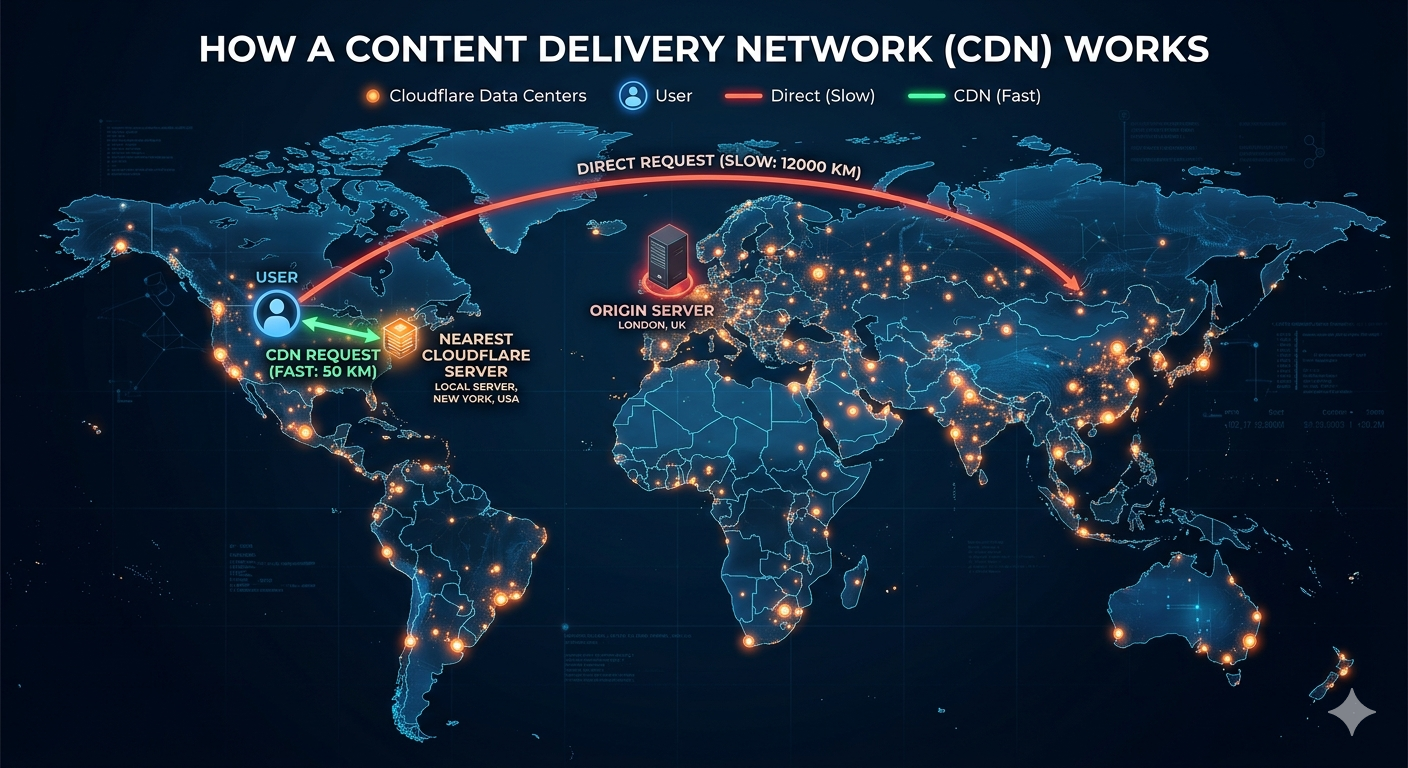
Cloudflare is like building a big warehouse right next to your shop. When people want to see your products, they go to the warehouse first. It is closer to them. It is faster. Only a few people need to go to your main shop.
For websites, this "warehouse" is called a CDN (Content Delivery Network). Cloudflare has data centers all over the world. When someone visits your site, Cloudflare sends the pictures and words from the closest center. This makes your site load very fast.
How Does Cloudflare Help Your Website?
Cloudflare does three big things for your site. Think of them as three layers of protection and speed.
1. It Makes Your Site Super Fast
Speed is very important. If your site is slow, people leave. Google also ranks slow sites lower. Cloudflare fixes this by saving copies of your site on its global network.
- Less Waiting: Your visitors get your site from a server in their own country. The data does not have to travel far.
- Less Work for Your Hosting: Your web host does not have to work as hard. This means less crashing during busy times.
- Better SEO: Google likes fast sites. When you use Cloudflare, your SEO score goes up.
2. It Stops Hackers and Bots
Every day, bad bots try to break into websites. They try to guess passwords or send fake traffic to crash your site. This is called a DDoS attack. Cloudflare stops these attacks before they reach you.
- Blocks Bad Bots: It knows the difference between a real person and a bad robot.
- Free SSL: It gives your site a lock icon. This keeps data safe and builds trust.
- Web Firewall: It blocks common hacks automatically. You do not need to be a security expert.
3. It Keeps Your Site Online
Sometimes your web host might have a problem. Your site might go down. Cloudflare can show a saved copy of your site to visitors until your host comes back. This means you almost never lose a customer because of downtime.
Step-by-Step: How to Set Up Cloudflare on Your Site
You do not need to be a programmer. Follow these 4 simple steps.
Step 1: Sign Up
Go to the Cloudflare website. Click "Sign Up." Use your email and make a password. It is free.
Step 2: Add Your Website
Enter your website address (like `yourwebsite.co.uk`). Click "Add Site." Cloudflare will scan your current DNS records. This only takes a few seconds.
Step 3: Change Your Nameservers
Cloudflare will give you two special addresses. These are called nameservers. You need to take these two addresses and put them into your domain registrar (where you bought your domain name, like GoDaddy or Namecheap).
Tip: This sounds hard, but it is just copy and paste. It takes 5 minutes. Changes may take 1 hour to finish.
Step 4: Turn On the Good Stuff
Once your site is live on Cloudflare, go to your dashboard. Turn on these four things right away:
1. SSL/TLS: Set this to "Full (strict)." This makes your site secure.
2. Auto Minify: Turn this on for JavaScript, CSS, and HTML. It makes your code smaller so it loads faster.
3. Brotli: Turn this on. It is a smarter way to zip your files.
4. Always Use HTTPS: Turn this on. It forces all visitors to use the safe, locked version of your site.

Does Cloudflare Help My Google Ranking?
Yes, very much. Google wants to show users sites that are fast and safe. Cloudflare gives you both.
- Core Web Vitals: These are Google’s speed tests. Cloudflare helps you pass these tests.
- Mobile First: Most people use phones. Cloudflare makes your mobile site fast on bad connections.
- Uptime: Google does not like sites that are always broken. Cloudflare keeps you online.
If you run an eCommerce store, a blog, or a local business site in the UK, Cloudflare is a must-have. It is the cheapest way to beat your slower competitors on Google.
Common Questions (FAQ)
Will Cloudflare break my email?
No. Just make sure you set your email records to "DNS Only" (the gray cloud). Do not put an orange cloud on your mail records.
Is the free plan enough?
Yes. For most small business sites and blogs, the free plan is very powerful. You get the CDN, DDoS protection, and SSL for free. You only need to pay for very large stores or special security needs.
Do I still need a web host?
Yes. Cloudflare is not a web host. It sits in front of your web host. You still need a company like SiteGround or Kinsta to store your files. Cloudflare just delivers them faster.
Final Thoughts
You do not need to be rich to have a fast, safe website. You just need Cloudflare. It takes less than an hour to set up. Once it is on, you will see better speed test scores, fewer spam comments, and happier visitors.
Your next step is easy. Go to Cloudflare right now. Add your domain. Change your nameservers. Turn on the four settings we talked about. Your future visitors will thank you for the speed.
Want more tools to grow your website? Visit SmallSEOTools.co.uk for more free guides and SEO tools.




 ™
™